
Intercom
Learn how to setup Intercom in Rowmesh
To use an chat widget to chat with your customers, and correctly pass the customer information to Intercom you can follow these steps:
Setup
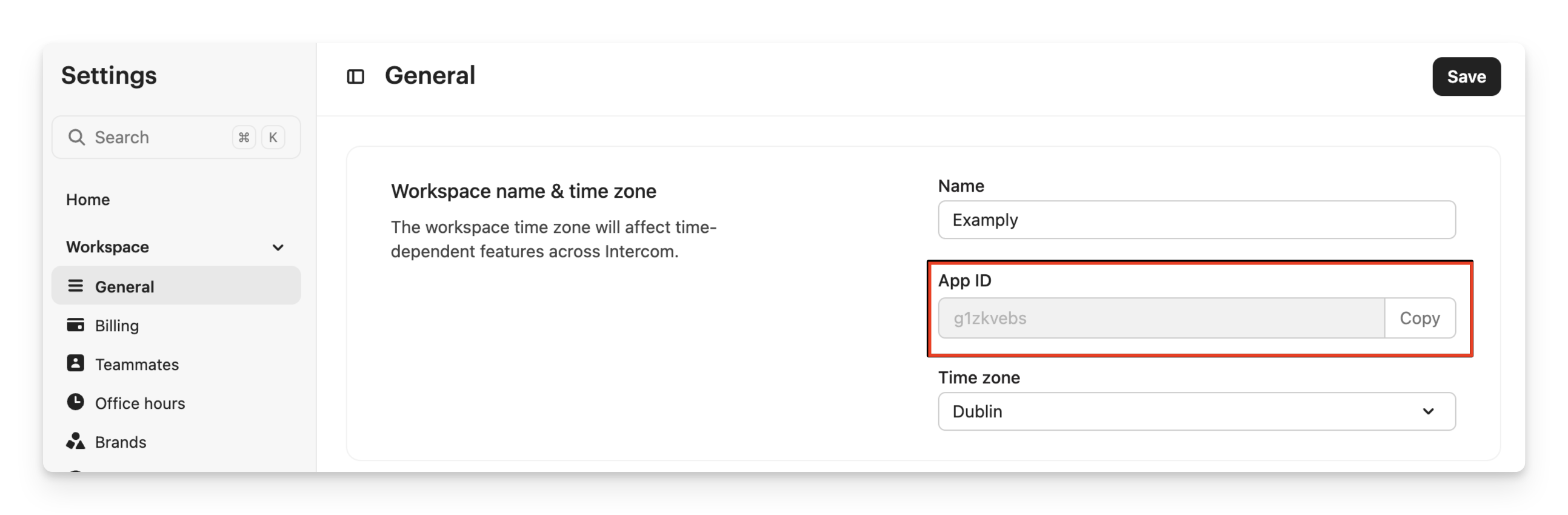
Add your Code Snippet
Next, go to the "Custom Code" section of your portal settings and enter the following code in the Header Code section or from here: https://portals.rowmesh.com/~/_/settings/custom-code, replacing <YOUR_APP_ID> with the value you found in the first step
<script type="text/javascript">
  // These two blocks prevent the Rowmesh intercom widget from loading
  window.loadIntercom = () => null;
  window.intercomLoaded = true;

  // You can put any custom settings in here
  // but you need this to override the Rowmesh Settings
  window.intercomSettings = {};

  var APP_ID = '<YOUR_APP_ID>';

  (function(){var w=window;var ic=w.Intercom;if(typeof ic==="function"){ic('reattach_activator');ic('update',w.intercomSettings);}else{var d=document;var i=function(){i.c(arguments);};i.q=[];i.c=function(args){i.q.push(args);};w.Intercom=i;var l=function(){var s=d.createElement('script');s.type='text/javascript';s.async=true;s.src='https://widget.intercom.io/widget/' + APP_ID;var x=d.getElementsByTagName('script')[0];x.parentNode.insertBefore(s,x);};if(w.attachEvent){w.attachEvent('onload',l);}else{w.addEventListener('load',l,false);}}})();

  window.Intercom('boot', {
     app_id: APP_ID,
  });

  function setIntercomSettings(user) {
    window.Intercom('update', {
     app_id: APP_ID,
      id: user.id,
      name: user.firstName + " " + user.lastName,
      email: user.email,
      company: user.company.companyName,
      // Add other values here
    });
  }

  window._RowmeshOnLoadUser = setIntercomSettings;
</script>Publish your Rowmesh Project
Finally, publish your project so that this is picked up when your users load your app.
If there are other details you need to send to Intercom be sure to request them in the app, and then just update the window.Intercom('update', ....) function call with whatever values you need.
More information
For more information on integrating Intercom you can read their help article:
If you have any other issues getting started with Intercom you can learn more in their Frequently Asked Questions:
Last updated
Was this helpful?